Paging for medical practices, from the front desk to the sound booth.
A medical assistant needs the scope in Exam 1 and the provider knows. A patient has had the spray and every screen shows the clock. Audiology is ready for the next hearing test and nobody walks the hall to say so. AltoSignal runs on the tablets, computers and phones your practice already owns, and it draws your rooms as a floor plan with every patient and staff member in them.
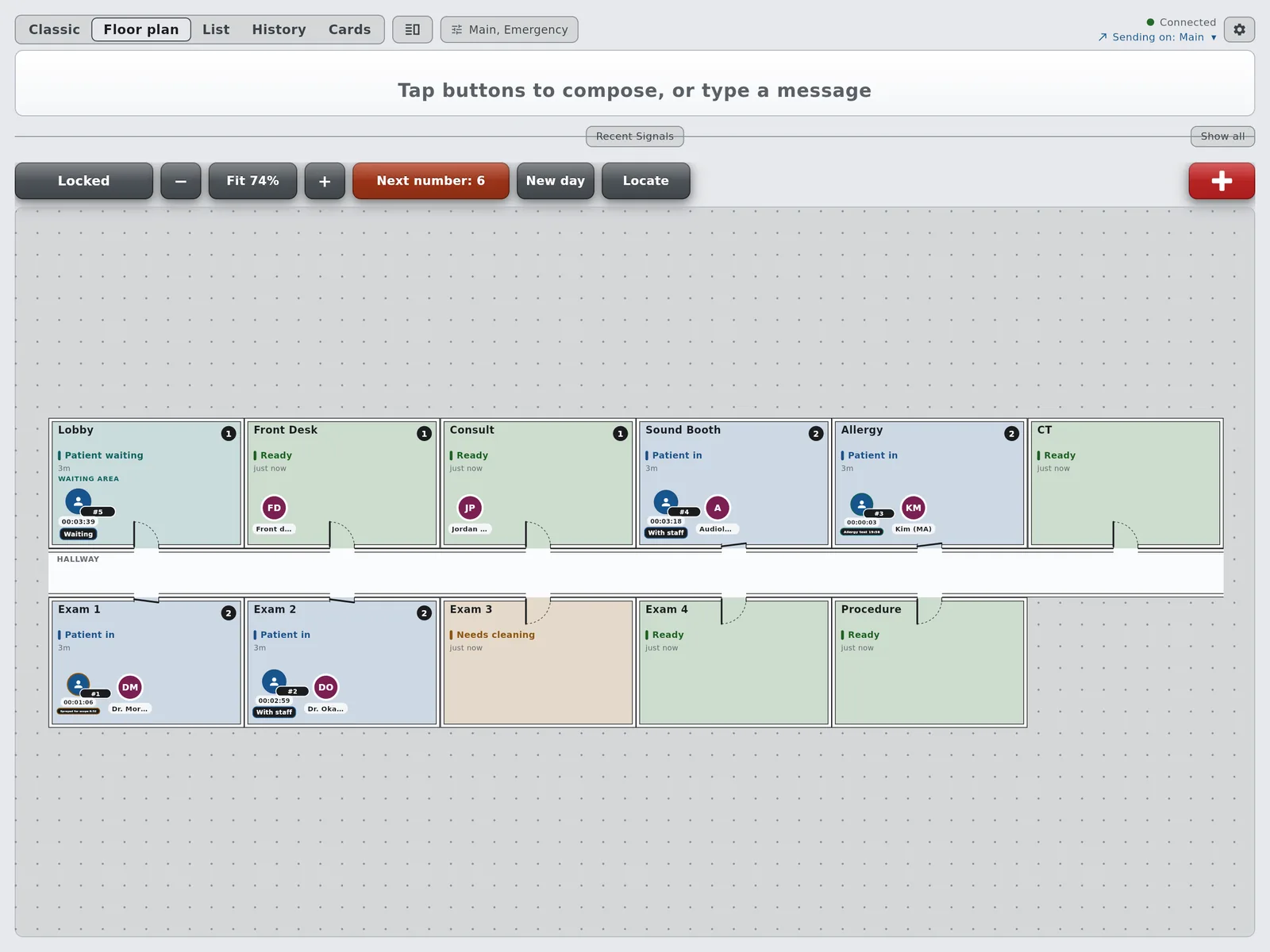
Mid-morning in a four-exam-room ENT practice: a scope spray and an allergy test running, five patients, six staff.
Why a medical practice needs more than a call light
The patient moves, the provider moves, and the clock matters.
Check-in, then an exam room, then a spray and a ten-minute wait before the scope, or the sound booth for a hearing test, or the allergy room for a skin test that is read at fifteen to twenty minutes. A flag on the exam room door says a room needs someone. It does not say who, or for what, or how long the patient has been waiting.
AltoSignal was built for staff to signal each other without a sound in the room they are signaling into. Since version 4.0 it follows the patient too: a number at the door, a room on the plan, a state with a timer, and a history of the day. The screens on this page are the AltoSignal app on a demo account set up as a four-exam-room ENT practice.
One morning in an ENT practice
The same account on every screen: the front desk, the exam rooms, the sound booth and a phone.
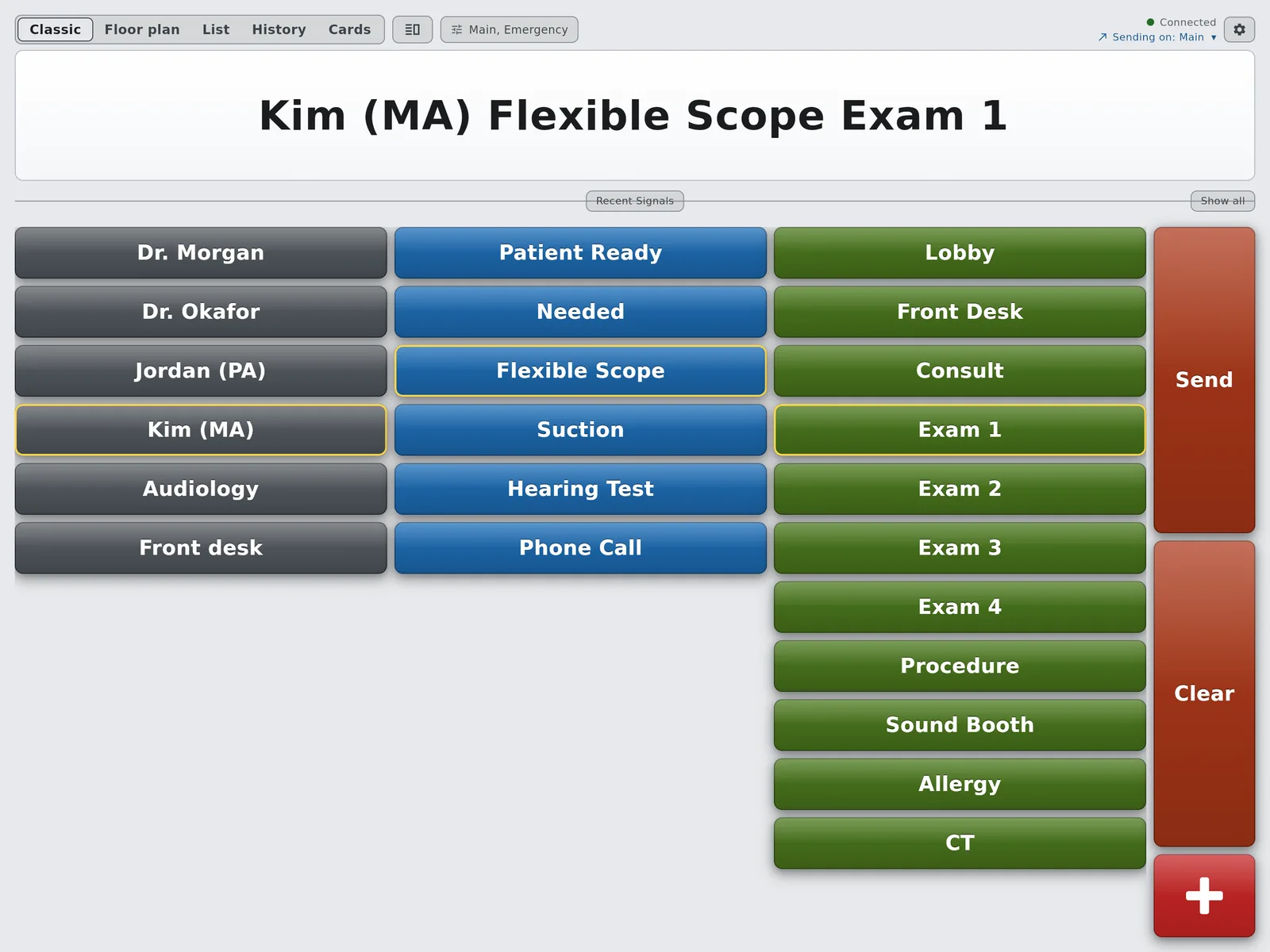
Three taps: Kim (MA), Flexible Scope, Exam 1.
01 · The page
Who, what and where, in three taps
The provider in Exam 1 needs the flexible scope set up. Three taps compose it, one more sends it, and it appears at once on every screen set to hear that channel. Nothing plays overhead and nobody leaves the room.
The buttons are your words: your providers, your requests, your rooms.
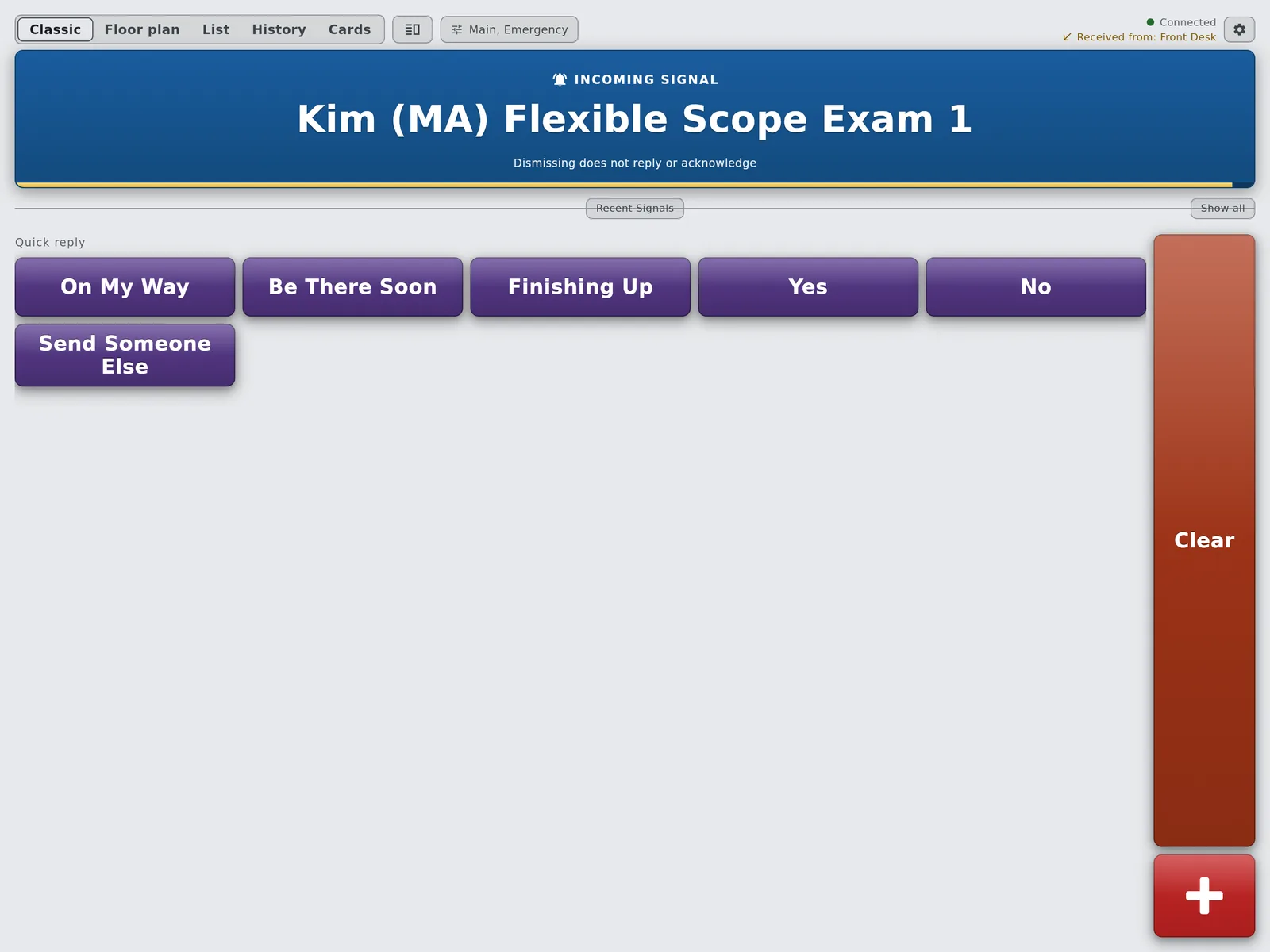
The page arrives with the replies ready.
02 · The answer
One press answers it
The medical assistant answers with On My Way, Be There Soon or a reply of your own. The sender sees the answer, acknowledges it, and it clears on every screen. Nobody wonders whether the page was seen.
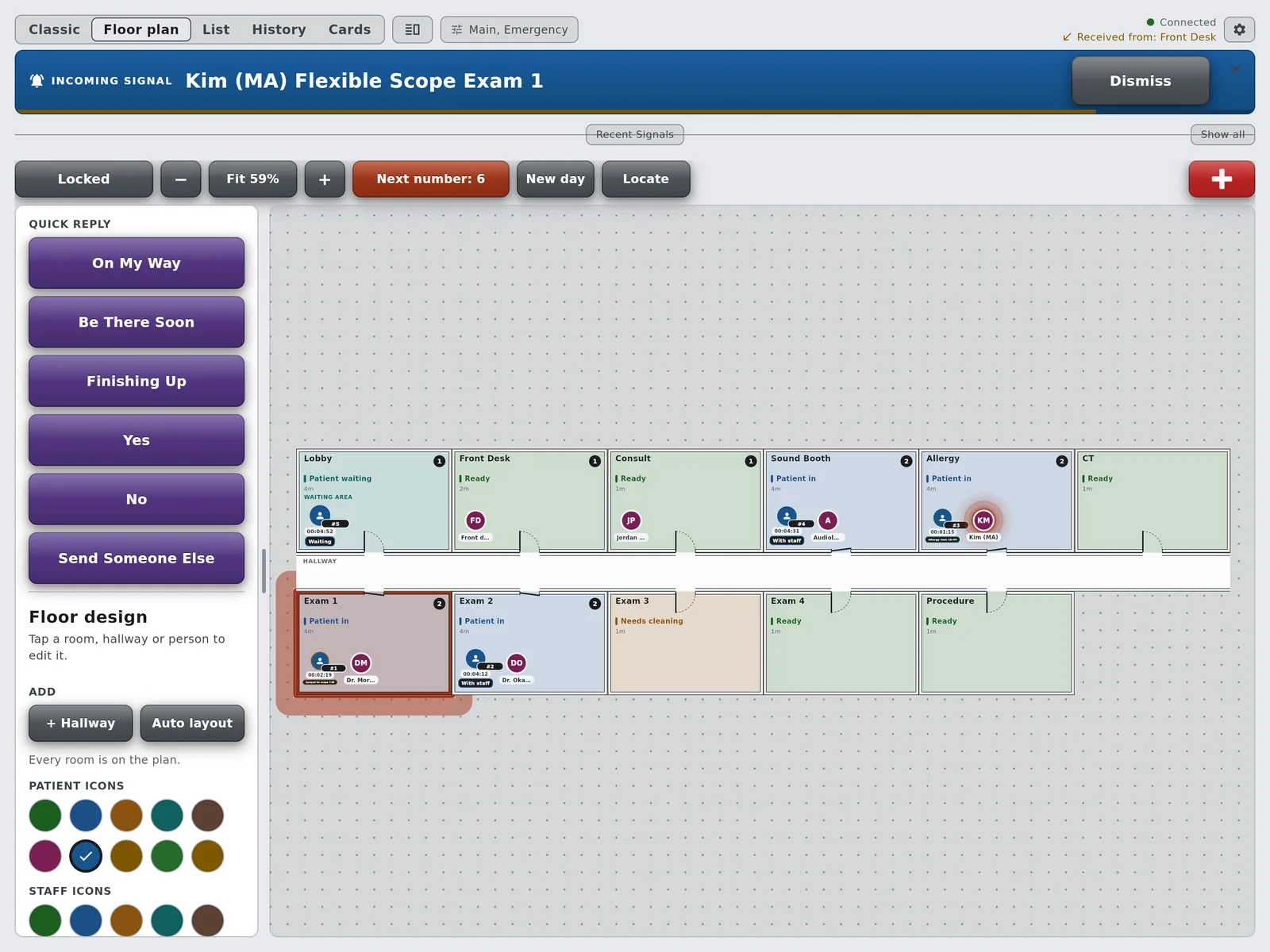
On the floor plan, the paged room lights up.
03 · The plan
Where everyone is, at a glance
Draw your rooms once. Take a number for each patient at check-in, drag people into rooms as they move, and every screen sees the same picture. A page lights its room on the plan. Locate finds anyone in one tap, and every patient and every room keeps a history of the day.
A timer lives on the patient, so the countdown follows them from room to room and shows on every screen.
Before a scope
Sprayed for scope 10:00
+The decongestant and numbing spray before a nasal endoscopy, and the wait before the scope goes in.
Allergy
Allergy test 20:00
+A skin prick test is read at fifteen to twenty minutes. The card pulses red when it is time.
Allergy shots
Shot observation 30:00
+The wait after an allergy shot, so nobody leaves early and nobody waits longer than they need to.
These are examples, not settings we chose for you. Name a state anything, give it any number of minutes in Button Setup, and every device on the account follows. A dermatology or family practice might time a numbing cream, a nebulizer or a post-injection wait instead.
The words are yours
The board in these screens. Rename anything, add rooms, or start from a blank board.
Where
Rooms on the plan
+Lobby, Front Desk, Consult
+Exam 1, Exam 2, Exam 3, Exam 4
+Procedure, Sound Booth, Allergy, CT
Who and what
The buttons
+Two physicians, a PA, a medical assistant, Audiology, the front desk
+Patient Ready, Needed, Flexible Scope
+Suction, Hearing Test, Phone Call
States
Rooms and patients
+Rooms: Ready, Patient in, Needs cleaning, Patient waiting, Out of service
+Patients: Checked in, Waiting, Sprayed for scope 10:00, Allergy test 20:00, Shot observation 30:00, With staff
What it replaces
Most medical practices are running one of these today.
01
Exam room flags and light systems
Colored flags on the door, or lights wired to a panel at the nurses' station. The meaning lives in the color: red for the provider, yellow for the MA. New staff learn the code; everybody else guesses, and the flag says nothing about how long the patient has waited. See the Comlite comparison.
02
Overhead paging and intercoms
A voice in every room, including the one where a provider is explaining a diagnosis. AltoSignal puts the page on a screen instead, with a tone only on that screen. See the intercom comparison.
03
A status column in the EHR
A field somebody has to be looking at. It works until the provider is in a room with the chart closed. AltoSignal is a separate screen that never holds patient data, so it can sit beside the EHR on the same computer without touching it.
Common questions
The ones medical practices ask before a trial.
Does AltoSignal connect to our EHR or practice management system?
No, and that is deliberate. AltoSignal holds no patient names, charts or PHI. A patient on the board is a number, an optional short label such as initials, the rooms they have been in and the times. Staff signal each other with buttons that say who, what and where. There is nothing to integrate, nothing to install on the practice management server, and a BAA is available on request.
How do the timers work?
A timer belongs to a patient state. Mark a patient Sprayed for scope and every screen on the account shows the same countdown on that patient. When it runs out the patient's card pulses red on every screen until somebody changes the state, and the clock keeps counting past zero, so the provider can see a patient has been ready for four minutes, not just that the timer ended. You choose the words and the minutes in Button Setup.
Does every exam room need its own tablet?
No. AltoSignal runs on the screens you already own: the computer in each exam room, an iPad or Android tablet by the door, an Amazon Fire tablet at the front desk, a phone in a medical assistant's pocket, or a browser on any computer. Billing is per device, so a practice with four exam rooms, a procedure room, a sound booth and the front desk typically runs eight to twelve devices. Staff seats are unlimited.
Can a group with several clinics use one account?
Today each location runs its own account with its own rooms, staff and floor plan, and one person can sign in to all of them. Per-user logins with roles, and single sign-on for larger groups, are the next thing we are building. If you manage several clinics, tell us at sales@altosignal.com and we will show you where that work stands.
What does medical office paging cost?
AltoSignal is priced per device, and the rate drops as you add devices. $25 a month covers your first 5 devices; devices 6–10 are $4 each, 11–20 are $3, 21–100 are $2, 101–200 are $1.50, and 201–500 are $1.25. Each band prices only the devices inside it, so a 10-device practice pays $45 a month. Pay yearly and you get two months free. Every plan starts with a 30-day free trial, no credit card.
Does it still work if the internet goes down?
Yes, inside the practice. Devices running the AltoSignal app on the same network hand signals straight to each other at the same time as the cloud, so the exam rooms keep paging the front desk through an outage. Local delivery can also be switched off per screen or for the whole practice if your IT team prefers every signal to go through the cloud. See how local delivery works.
Try it in your own exam rooms this week.
Put the app on the screens you have, name your rooms and providers, and page an exam room from the front desk before lunch. Cancel anytime, no phone call.