Local delivery
Devices on the same office network now deliver signals straight to each other, at the same time as the cloud. Both paths carry every signal. When the connection drops, your team keeps signaling and there is nothing for anyone to do.
Three things a practice manager can check off.
It runs on the tablets and phones your team already knows how to use. No server in a back closet, nothing loaded onto clinic computers, and no IT project to schedule.
A practice with two or three offices runs all of them from the same account, with one place to manage staff, rooms, and channels.
On typical office networks, a signal crossing the operatory takes the short trip instead of the long one out to a data center and back. If the connection drops, signaling keeps working.
Every signal goes out both ways, on every send.
One copy goes straight to the other AltoSignal devices on your office network. The other goes through the cloud, the way it always has. Every device that should hear the signal hears it once.
Nothing watches for an outage and nothing switches over, because there is no switch to throw. The local path is already carrying the signal before anything goes wrong, which is why there is no delay to notice and no state for staff to be aware of.
Said plainly, because it is a trade and not a magic trick.
Keeps working
Waits for the connection
That is the honest shape of it. What clinical staff use every minute keeps working. What an administrator touches a few times a year waits until the connection is back.
Quiet by design, and switchable when a policy says so.
The IT manager of a 26-location eye care group came to us after the paging system he had inherited flooded the office network with multicast traffic and knocked out the VoIP phones he had just installed. He moved it to its own VLAN and the traffic still leaked. The vendor told him the software was still on .NET 4 and broadcast to everything. He replaced it with AltoSignal.
Local delivery here is a small discovery beacon and direct one-to-one connections on a single port, 49374, encrypted end to end with a key that belongs to your account. There is nothing to flood: a signal is a few hundred bytes to the screens that should hear it.
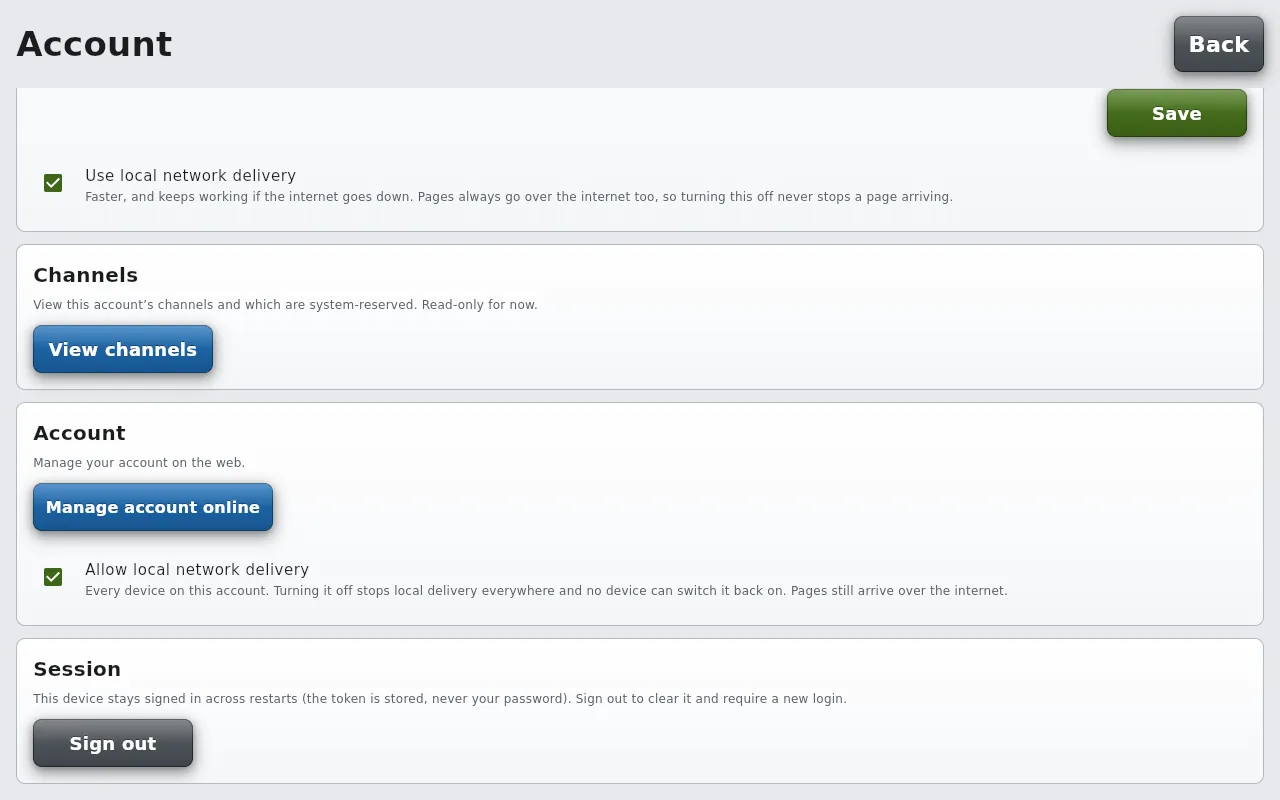
And when a network policy wants none of it, it is one switch, on the Account screen of any signed-in device:
Per screen
Whole account
There is no step here. That is the whole feature.
Devices find each other on the network by themselves. There are no fixed addresses to assign, no router settings to open, no server to stand up, and nothing to install on a clinic computer. Sign in on a device and it joins in.
Office networks do vary, and some configurations stop devices from discovering each other. On typical office networks it works with no setup at all, and the cloud path carries every signal either way.
The app takes part. The browser keeps doing what it always did.
Local delivery runs in the AltoSignal app on tablets, phones, and desktop. Those are the devices that hand signals to each other directly.
The browser version keeps working everywhere and still needs nothing installed, which is what makes it useful for a spare screen or a quick sign-in. It does not take part in local delivery, so a browser device receives through the cloud.
Fast inside the building, or reaching past it.
Signaling software that lives entirely inside the office is quick and dependable for exactly that reason. It is also why it cannot reach a second location, why something has to run on site, and why it takes IT involvement to put in and keep going.
Signaling that lives in the cloud reaches anywhere and installs nothing. It also stops when the internet does.
AltoSignal now does both, from one account.
Yes, and the reason the switch exists is a story we heard from the IT manager of a 26-location eye care group. The paging system he had inherited flooded the office network with multicast traffic and knocked out the VoIP phones he had just installed; he moved it to its own VLAN and the traffic still leaked. AltoSignal's local path is a small discovery beacon and direct encrypted connections on one port, so there is nothing to flood, and when a network policy wants none of it there are two switches on the Account screen: Use local network delivery, for one screen, and Allow local network delivery, for the whole account, which no device can override. Pages still arrive over the internet either way.
Nothing, and there is no step to skip. Devices find each other on the office network by themselves: no fixed addresses, no router settings to open, no server to stand up, nothing loaded onto a clinic computer. Sign in on a device and it joins in. Some networks stop devices from discovering each other; on a typical office network it works with no setup, and the cloud path carries every signal either way.
Signaling between the devices on your office network does, because the local path is already carrying every signal before anything goes wrong. Changing the setup, such as editing buttons or adding a channel, waits until the connection is back. That is the honest shape of it.
No. The browser version keeps working everywhere and still needs nothing installed, which is what makes it useful for a spare screen or a quick sign-in, but it does not take part in local delivery, so a browser device receives through the cloud. The apps on tablets, phones and desktops are the devices that hand signals to each other directly.
Set it up on the screens you already own in under ten minutes. Cancel anytime, no phone call.
Start 30-day free trialWant to see it running first? Follow one morning in a practice, front desk to operatory.
Not a dental practice? The spa site covers the same ground for treatment rooms: how spa paging systems compare, and one account across several properties.
